Technological shrinkage
Modern Computing
AKA: shouting at clouds
I'm old, and I don't like change. So this review is split into two parts. First is my initial experience with the Mac M4 Mini. It goes about as well as you could expect. Second is after a couple of weeks of use.
It doesn't 'just work' anymore
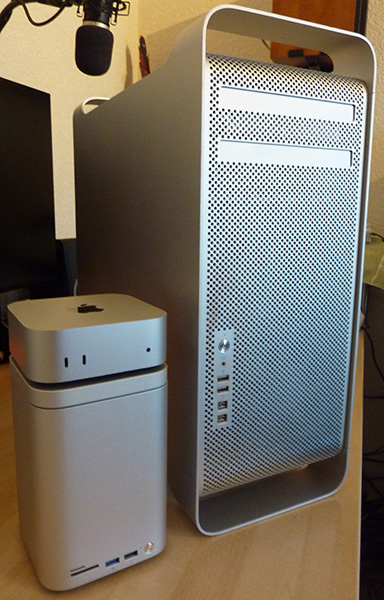
I'm finally retiring the legendary Classic Mac Pro. 16 years old and still an absolute beast of a machine. Sadly it's so out of date it started to become an issue and I've been looking to what's next. I built a Linux box and have been using it a fair bit, getting used to it's idiosyncrasies. I like it, but I'm used to Macs. I've been using them since I was in college and I like the way they go about things. So I've bought the cheapest modern ARM Mac there is, the M4 Mini.
Technological shrinkage
It's very wee, which means it has feck all connectivity. One HDMI, 5x USB-C, Network and a Headphone jack. That's your lot. Want to connect your old Mac keyboard? Buy an adapter. Want to have external drives? Buy an enclosure. Want to do anything, you'll buying something to supplement it's barebones nature. It is pretty much silent however, and cheap enough for what is a very useful piece of kit for general computing. But it is the Trashcan taken to the nth degree, a cute box that will inevitably have a spaghetti of shite hanging from it to be useful.
It shipped with Tahoe on there which I did not want to run for multiple reasons, and this is the first time it balked. Back in the day there was nothing easier than upgrading a Mac, you could just lift and shift your old drive into a new machine and it'd work (you can still do this on Linux). These days, not so much. You try and regress the OS on this computer and it says no. Of course there are ways and means, but that also highlights some other things I'm not keen on.
Installing an OS on a Mac is now a complete pain in the arse. It used to be a drive or a USB stick, hold down a key, boot and off you go. Nice and simple (again, you can do this on Linux and be up and going with a fresh install within 30 mins or so). Yeah, firstly you need to download the Sequoia installer from the App Store, which I was genuinely surprised it allowed me to do from a Tahoe Mac. Then some command line stuff to create a bootable installer on an external drive. That took about an hour alone, not counting the download.
Booting, all going fine. Then computer says no again. You will NOT install an older OS on this machine than the one it has. So to remove the one it has... Click to erase the internal drive. It did not want to do this. It's basically putting big red buttons up to deter you. Think fuck it, I'll return it if it bricks it, and blow away the internal drive. It then reboots and does something I absolutely hate. It, now a virgin machine with no OS, wants to connect to Apple to authorise the hardware. I consider the online authorisation of something you bought and supposedly own to be the most anti-consumer bullshit on planet Earth. Sony do the same thing with the PS5 and more gratingly, the optical drive in the PS5. You will own nothing and be happy...
Then back to the installer, after a false start, it eventually started the install. Another hour and fifteen minutes later and the machine is finally rebooted and back at the initial login prompt of the OS I wanted to run. It was needlessly stressful, convoluted and not Mac-like as I've been used to in the past. But we got there.
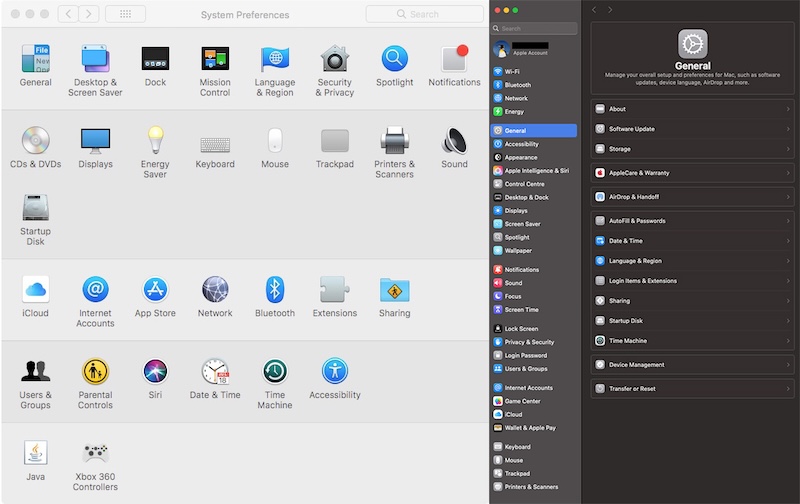
System Prefs High Sierra vs Sequoia. Whomever thought this was a good idea should be at least fired, if not shot.
After clicking anything but yes to the numerous systems that want to harvest your data. This is where it ceases to 'just work' like the slogan of old. Where Steve Jobs would chew out the dev's of the OS when things were unintuitive. They've made settings (was prefs) look like an iPhone for some inexplicable reason. Nothing is in any sort of logical order and shit is buried in places that don't always make sense. This is a fucking computer with a mouse/trackpad and a keyboard, why does it have parts of it that work like a phone with a limited touch screen? It's idiotically unintuitive, but I suppose people brought up on phones might have an easier time of it? I genuinely don't see how.
Here's an example: Date/Time & Timezone, the most basic and simple settings on a computer. On first login to your Mac they always establish where you're from before anything else. So it can communicate with you in your language and so it can present you with the correct 500 page EULA that you accept without reading. It's literally the first thing it asks. You set it up, in my case, as English (UK) and choose my location as London. Simple you'd think. In the past, from this it would set the timezone then set my date and time. It's how they've always worked after all. But that was before Location Services. A function that makes complete sense on a phone, iPad, watch and laptop, which are all portable devices. It's a function that will not change on a desktop computer often so location services are not required, and I like to turn things off I don't use.
Automatically it sticks me on Pacific time in the US. Nothing to this point has placed me or the machine in the US. Fine, I'll set it manually. Select the NTP server, easy, click the drop down for location and it gives me only US addresses and one in Mexico. No option other than Pacific time. No obvious way to tell it I'm in the UK on GMT. It's supposed to just work, it's supposed to be simple. I had to search online and find out that if you click the US address you can delete it, type in London and it magically fills in the rest and indeed does as it's supposed to. There were loads of people who'd run into this online. A stupid oversight on one of the most basic functions of every computer.
EDIT (inserted after I'd written the initial review) - More enshittification noticed: I have apps that fire up at login that just live in the background. Normal stuff like mail, VPN, etc. Old Mac OS's had an option to minimise the application so it didn't spooge windows all over the screen every time you reboot. Linux does this (well depends on distro, but Mint appears to), hell even Windows does it. Apple, pulled this functionality in Ventura and it never returned, for fucks sake why?
I suppose I'd better get used to it. I'll now transfer all my old drives from my Mac Pro into China's finest expansion tower thing (seen briefly in the picture beside the cMP) I'll still need another USB hub of some description as most of the ports are USB2 on it (it has one 3.2), but it was the only thing I could find that'd take a pair of old spinning hard disks and an NVME drive. It's fine, it's up to date and I'll be able to run things again. But I'm not sure I shouldn't have just continued with Linux. It actually reminds me more of Mac OS of old. It seems to understand why a computer exists and what people use them for. This OS just seems confused. Plus it's integration of cloud and AI slop all the while the user experience is seemingly getting worse, makes it harder and harder to point people at Apple and say: get a Mac, it just works.
Things have changed
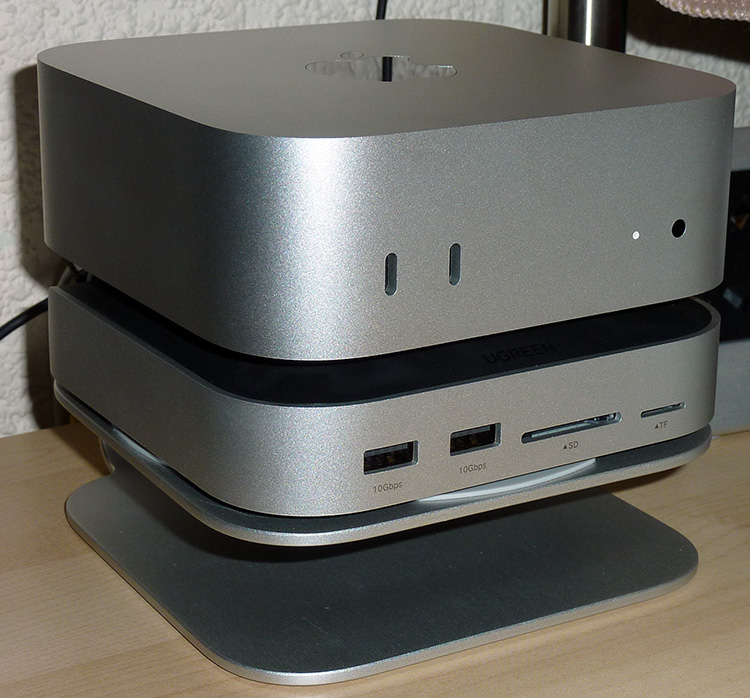
The Yottamaster tower didn't spin the drives down when not in use (unlike my Sabrent enclosure which I use for archiving stuff). Meaning that frankly, it's noisy. Two drives and a fan sat on a desk will do that. So while it was within its return window I ordered a Ugreen dock to replace it. I just need the hub bits at the moment to use the thing with all my old legacy equipment. You know, mouse, keyboard, webcam, audio interface. Sensible stuff you might want to plug into a machine that doesn't have such things. Now to be fair I do have some unused wireless Apple stuff. But I prefer the wired full width Apple keyboard. I've tried to get on with the trackpad but I prefer the mouse. I've tried to get on with the Mighty Mouse, which is better (for me) than the pad, but I prefer a proper Logitech G500.
Getting there. The idea with this thing once it's finally sorted is that I hope it lasts me another 10 years. So a bit of initial pain is to be expected. But it's certainly not a Mac designed for people used to old Mac Pro's and Power Macs. Cheap though. Keep coming back to the fact that it's actually something from Apple that's cheap and, in the scheme of things, really good value.
So it went for my initial impressions. Despite it being the cheapest new computer I'd bought since my Atari ST, I was not feeling like I'd made a great decision. However I write now after a couple of weeks, and after the initial age rage has subsided somewhat. Things have settled and I've been using it as my main computer.
In bang-per-buck terms, it is probably the best computer you can buy right now. Mostly, the pros now outweigh the cons, mostly... It's small, even with its new dock and stand. A stand that was required because the NVME drive I used has a heatsink bonded to it so hangs low out of the bottom of the dock. Now initially I considered just propping it up on blu-tac blobs, but I needed to get my order over a threshold from Amazon to get free delivery so stuck that on. Man maths justifying the purchase of something entirely unnecessary (I've grown to kinda like it).
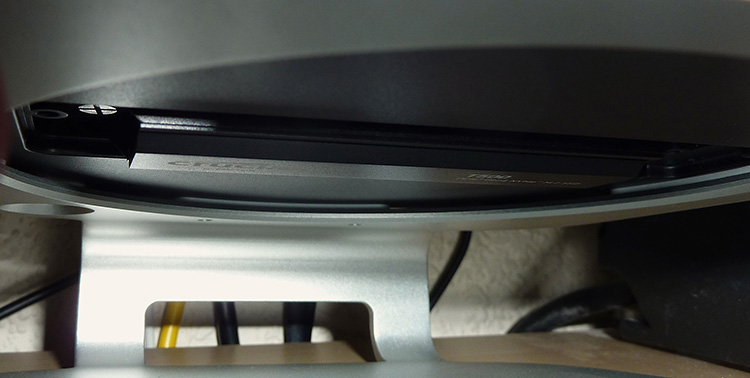
Blu-Tac would have been a cheaper solution
It does have a fan but it's quiet and really only kicks in when you pummel the machine. In most normal use the M4 is completely silent. It does the modern Apple thing of thermal throttling when you hammer it rather than run the fan up sooner. I've never liked that but I'm not planning of running it flat out all the time encoding stuff. Plus it's still so massively faster than the old machine even throttled, that I'm ok with that. Loading up the GPU cores with a local AI upscaler was also interesting, that didn't throttle, but pulled more power than I've ever seen from this machine at 42W (it idles at around 12-14W with all the crap I've got hung off the back of it). Still insanely low when you consider the many hundreds of watts the old one will have run at. The ARM architecture is staggeringly impressive when it comes to performance per watt.
It is the first Mac in a long time that doesn't brick itself if the internal drive fails requiring a trip to Apple to replace. Not by design mind you, it is user replaceable if you have access to a second ARM Mac to configure it when you swap in China's finest replacement drive. It's one of the main reasons I've specifically bought this machine as it has a tiny bit of user maintainability. Rare these days in the age of ever decreasing right to repair laws. It even turns out that the new MacBook Neo is mostly user repairable. I'd like to think that Apple has finally seen the light, but I suspect it's European legislation again forcing them to do the right thing like it did with USB-C.
Essentially with all the bits I've finally added to this machine, which I'll go into below, I would say that it's fulfilling 90% plus of the role that the classic Mac Pro did. Some things are out of its control. The main one being PhotoShop. I have an ancient stand alone copy that just works on the old Mac and does everything I want it to do. It won't run on ARM even with Rosetta as it's that old (32 bit). Adobe now want you to subscribe to their software and put all your data on their servers so they have access to it (gotta feed that AI something for them to sell back to you). I tried Affinity but I just couldn't get on with it. I've been looking for something and found nothing. So I still have my old machine configured just for running some old software that there are no real modern alternatives to that aren't online bullshit.
Likewise I still have the old machine to run the old spinning hard drives. It's mainly for data archiving and what have you. But it made sense just to put them back rather than try and run them on the Mini if the old machine is still going to be plugged in.
As I mentioned above, it doesn't just work and some parts of the user interface are now horribly unintuitive. But once you get past that and just start using it, it's a decent machine. It could be better, for sure. A lot of it comes down to Apple's bizarre annual OS refresh. Fine if it was just fixing shit, then doing a major release for when they make massive changes. But it just seems like an excuse to force obsolescence of old kit more than anything else and the OS itself is suffering as a result. In comparison to High Sierra it's frankly a mess. At best it's unintuitive, at worst useful features just vanish and some parts don't work. The hardware, for how little of it there is, is good and it becomes about what you can hang off it to replicate all the features old computers had as standard. What's amusing about that is that no one is buying the missing stuff from Apple so I don't really see the point of them removing these features to make no money from the solution. Then again there's not a lot about Apple that has made sense for quite some time.
The machine as it stands consists of a base M4 Mini (540UKP), a UGreen dock (65UKP), a 2TB Crucial T500 NVME (100UKP), the little stand thing from an unpronounceable Chinese maker (20UKP), an Orico USB3 hub thing that plugs into one of the USB-C sockets (4.23UKP), and a Behringer UFO202 that adds a line in and line out (21.80UKP). Which realistically means that in total the whole machine was a smidge over 750UKP. Still sensible money, but fractionally more than I spent on the Linux box.
I'll still stick with the Mac as I like the way Mac's work, but I'm liking it less these days. Linux has already started replacing Windows machines, if Apple aren't careful they might be the only option left for people who just want a computer.
[ back ]